> For the complete documentation index, see [llms.txt](https://docs.powerembedded.com.br/llms.txt). Markdown versions of documentation pages are available by appending `.md` to page URLs; this page is available as [Markdown](https://docs.powerembedded.com.br/en/faq/technical-questions/how-does-power-embedded-work-internally.md).
# How does Power Embedded work internally?
The internal workings of Power Embedded for displaying reports are described below:
1\) Power Embedded checks if the logged in user can access the report and sends the data to apply the RLS (if any).
2\) Power Embedded authenticates to the Azure API and retrieves a token for authentication
3\) Power Embedded sends the necessary metadata to the Power BI APIs (Workspace, Report and Dataset IDs)
4\) Power BI API loads the data that is stored in the workspaces and the report
5\) Power BI API assembles the iframe element pointing to the ready-made report and returns it to the system
6\) Power Embedded displays the returned iframe to the user. NO report data is read, accessed, stored or trafficked by the system's servers
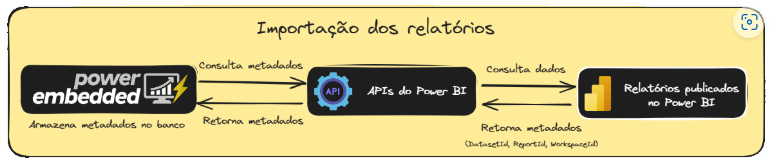
The internal workings for importing Power BI reports into Power Embedded are described below:
1\) Power Embedded interacts with the Power BI API's
2\) API returns the metadata required for display (Workspace, Report and Dataset IDs)
3\) Power Embedded stores the returned metadata
4\) Administrator manages permissions, RLS, folder structure and other report attributes
5\) NO personal data is stored by Power Embedded, only the users' email and name.
6\) NO report data is stored or travels over the network, or through Power Embedded's servers.
## Power Embedded internal documentation
{% embed url="" %}