# First Access

{% hint style="info" %}
To personalize the **portal URL** and use your **own domain**, go to [**DNS Configuration**](/en/administration-portal/dns-configuration.md).
{% endhint %}

{% hint style="warning" %}
For the **automatic billing system** to generate charges on the desired due dates, send them to the correct list of people, or include a **purchase order number**, go to [**Billing Settings**](https://admin.powerembedded.com.br/Organization/BillingSettings/).
{% endhint %}

### User Creation

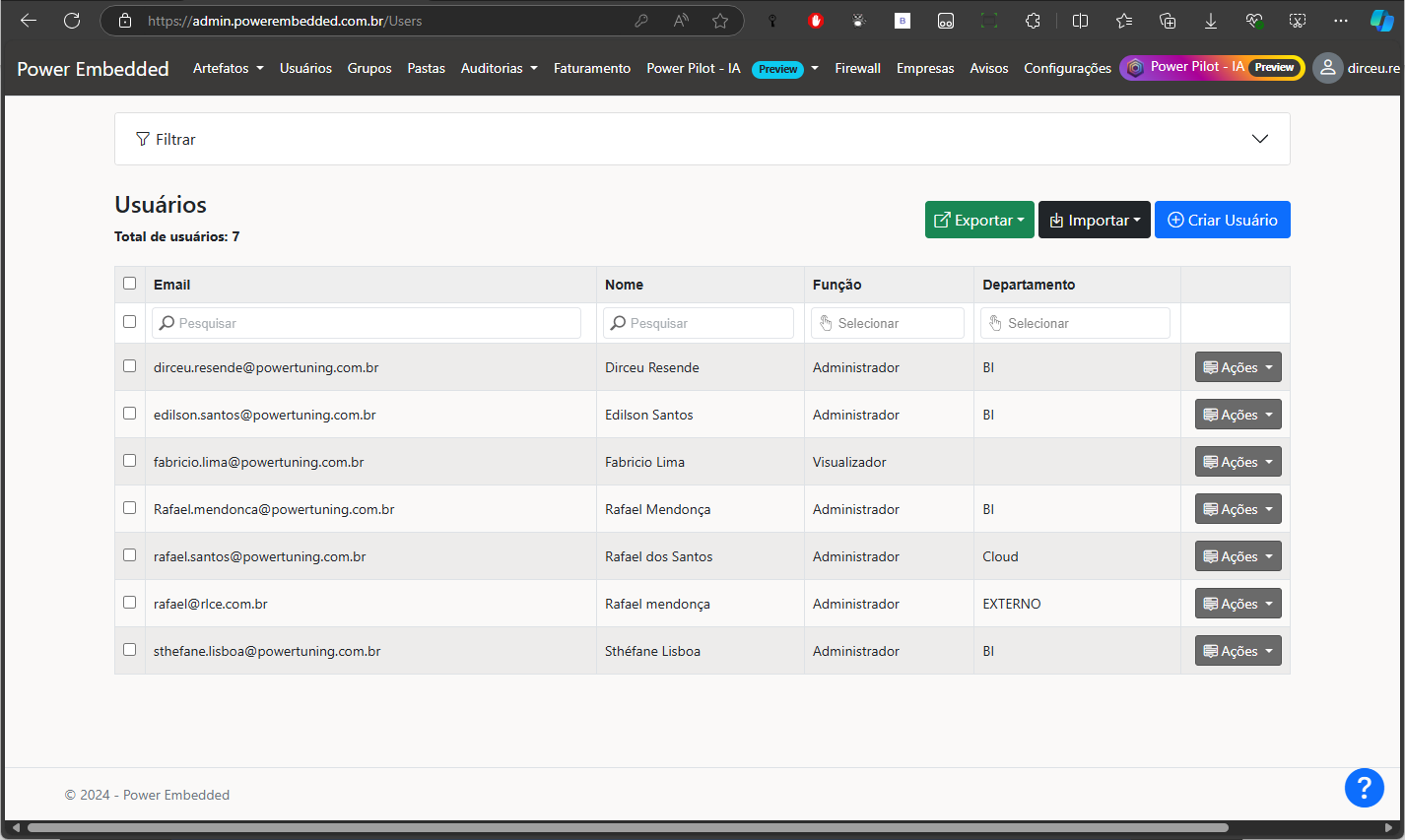
The **first step** to using **Power Embedded** is to configure users who will **administer the platform** and those who will **only view reports**.

[**Click here**](https://admin.powerembedded.com.br/Users) to access this screen.

After creating users, remember to Define user **permissions,** Assign them to **groups,** Specify **which reports** they can access.

{% hint style="info" %}
For more details on user **creation and management**, visit the [**User Management**](/en/administration-portal/users.md) page.
{% endhint %}

Ways to Create Users:

* **Manually**: Fill out the registration form fields.
* **CSV Import**: Upload a user list from a CSV file.
* **Entra ID (Azure AD) Import**: Import users directly from **Azure AD**.
* **API Integration**: Use an API to connect with any system or programming language.

<div data-full-width="false"><figure><img src="/files/lEyeLLmTOvTsuj1ZCs53" alt=""><figcaption><p>Initial user registration screen</p></figcaption></figure></div>

### Group Creation

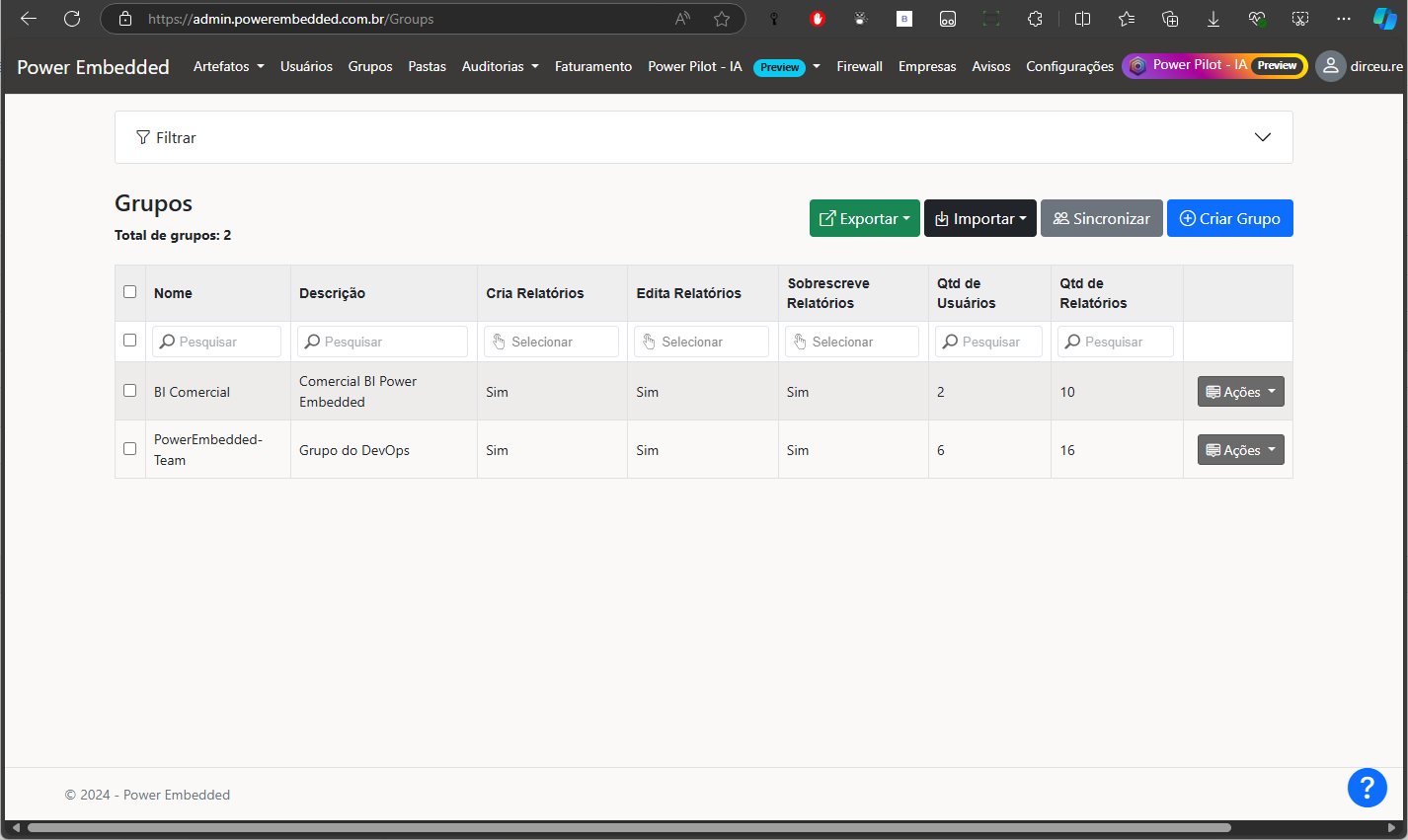
Groups in **Power Embedded** help manage and govern users by **grouping them** for easier **permissions, RLS, and report access management**.

[**Click here**](https://admin.powerembedded.com.br/Groups) to access this screen.

{% hint style="info" %}
For more details on **group creation and management**, visit the [**Group Management**](/en/administration-portal/groups.md) page.
{% endhint %}

Ways to Create Groups:

* **Manually**: Fill out the form fields.
* **CSV Import**: Upload groups from a CSV file.
* **Entra ID (Azure AD) Import**: Import groups (and optionally, their users).
* **Entra ID (Azure AD) Sync**: Sync groups with Azure AD to **automatically create/delete users** in Power Embedded based on Entra ID changes.

<figure><img src="/files/4Jbk4jDDh1C4XPcsLJQF" alt=""><figcaption><p>Initial group registration screen</p></figcaption></figure>

### Report Import

A crucial step to making the portal functional is **importing reports**.

[**Click here**](https://admin.powerembedded.com.br/Reports) to access this screen.

#### Import Options

There are three types of report imports:

1. **Power BI Report**: Import existing reports from **Power BI**.
2. **Web Report**: Import reports from **online sources** like **Google Data Studio, OneDrive, Tableau**, and **Power BI Workspaces**.
3. **Power BI File**: Publish **PBIX files** directly to Power BI without needing **Power BI Desktop**.

#### Power BI Report Import

View **all workspaces** where **Power Embedded** has admin access.

<figure><img src="/files/gRdYCcpzq7tIyOpv2m0G" alt=""><figcaption></figcaption></figure>

Import reports **individually** or **all at once**.

<figure><img src="/files/SrcaAQYRvA1I6J5NTHw6" alt=""><figcaption></figcaption></figure>

#### Web Report Import

In **Power Embedded**, you can embed **web reports** or documents stored in **SharePoint, OneDrive**, and other sources. For example, if you have a **dashboard in Google Data Studio** and need to view it here, simply insert the **link**, and it will be automatically recognized as an **external report** in the portal.

![](/files/RJcosq5k6bbauwSwSsL7)

If embedding is restricted, use the **"Open in a New Tab"** option for seamless integration.

#### Power BI File Import

You can also publish Power BI reports that are locally on your computers to workspaces in the Power BI service, giving your users greater freedom and autonomy.

![](/files/fImZpRc82ycGHbfjaB37)

{% hint style="info" %}
Learn more about this feature on the [**Publishing Reports to Power BI via Power Embedded**](/en/administration-portal/reports/publish-report-to-power-bi.md) page.
{% endhint %}

### Portal Customization

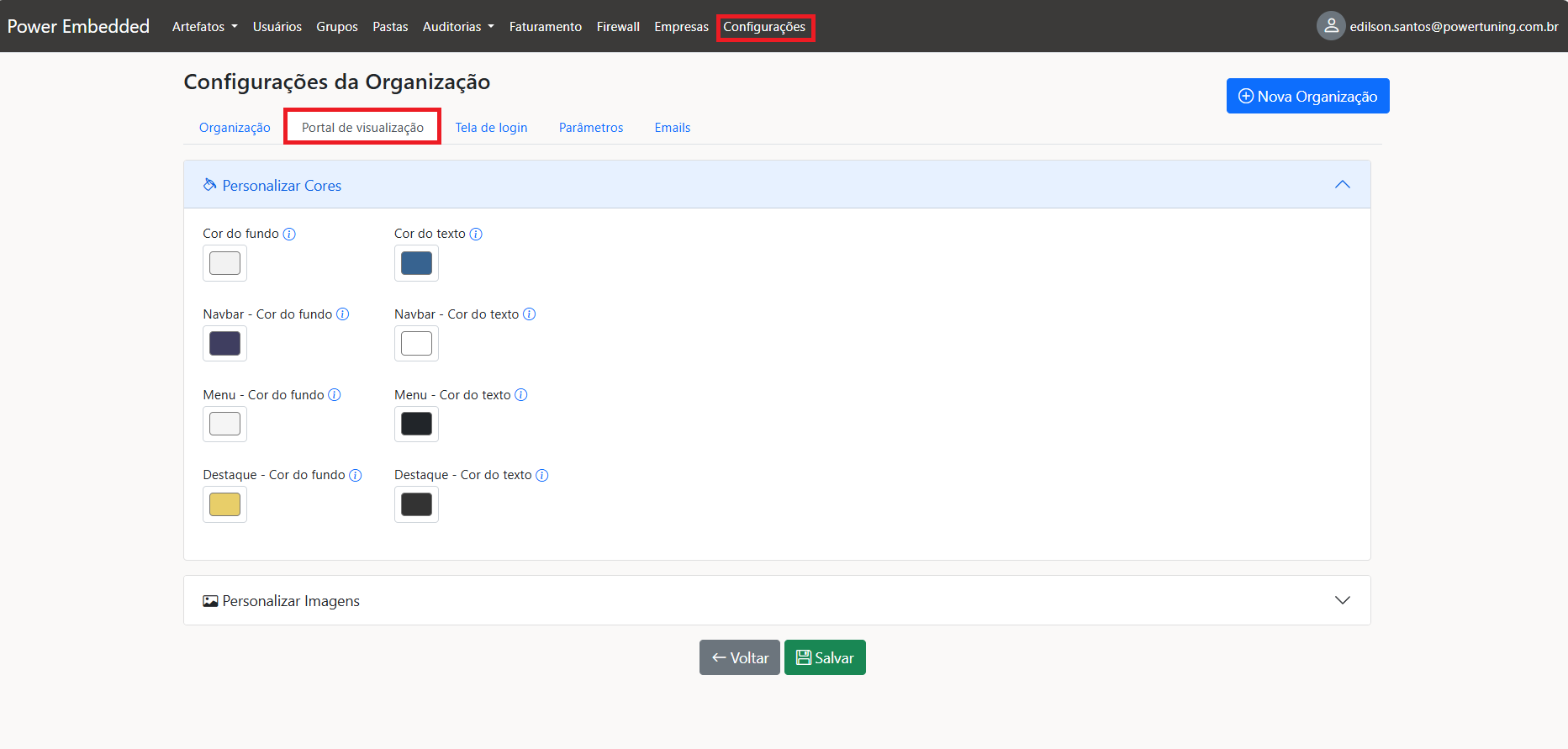
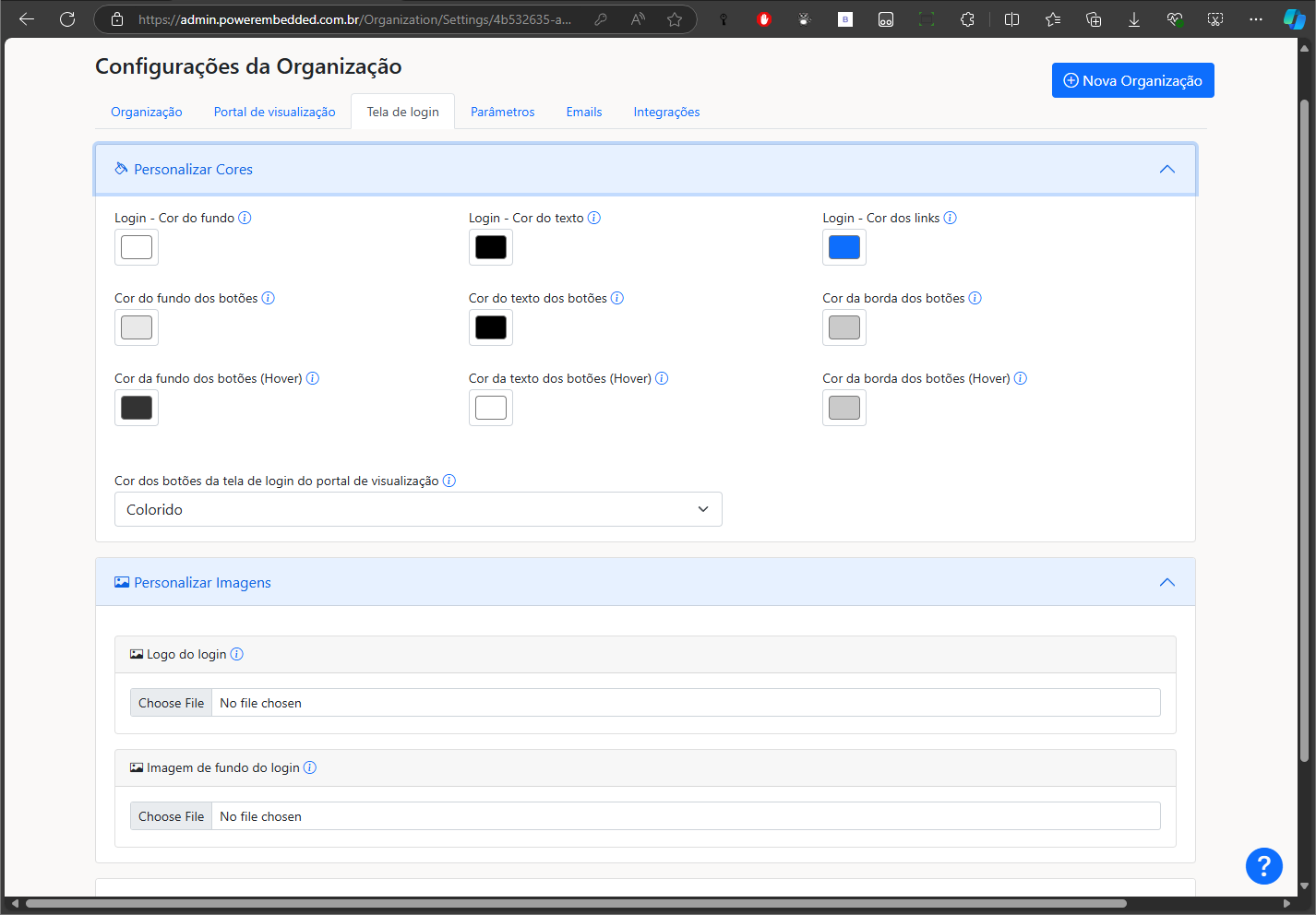
Power Embedded is a **fully customizable white-label system**. This is where you **personalize the user experience** with your **company’s branding**.

{% hint style="info" %}
For more details, visit the [**Settings** ](/en/administration-portal/settings.md)page.
{% endhint %}

**“Visualization Portal” Tab**: Set portal **colors and images**.

<figure><img src="/files/5UIbNIEBOsURxtLqLdWW" alt=""><figcaption></figcaption></figure>

**Login Screen Tab**: Customize the **login screen’s colors and images**.

<figure><img src="/files/vQSEQWVmw5z6DQ8XNW5K" alt=""><figcaption></figcaption></figure>

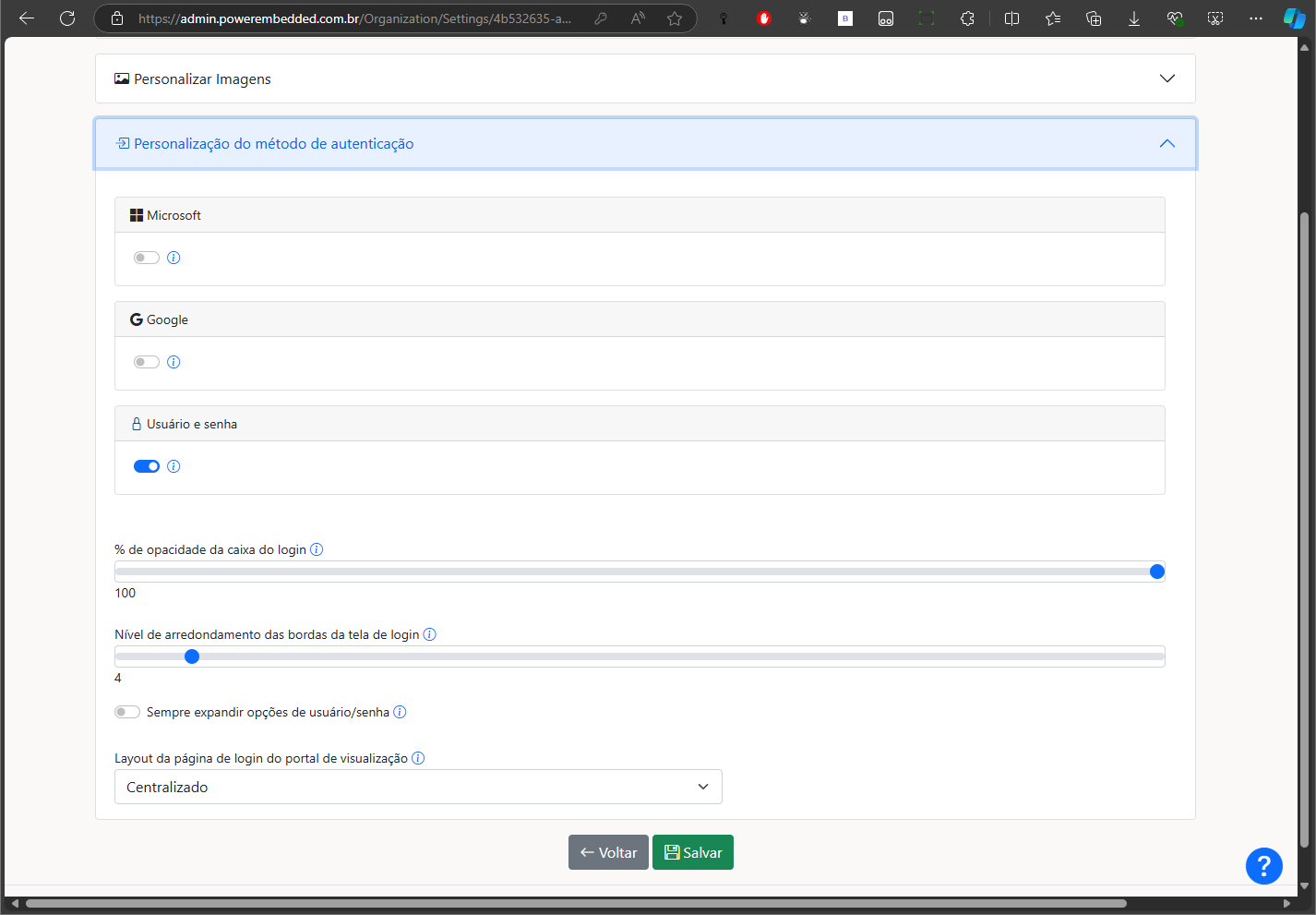
You can also customize the authentication methods supported by the platform and configure other login screen customizations.

<figure><img src="/files/HsyExxDxunCJxIdFXmJC" alt=""><figcaption></figcaption></figure>

If you block any authentication method, no user will be able to authenticate using that login method and it will not be shown on the login screen.

If this authentication method is enabled, it will be shown on the login screen, but you can block it at the user level so that that specific user cannot use this authentication method.

### Main Documentation

<table data-view="cards"><thead><tr><th></th><th></th><th data-hidden data-card-cover data-type="files"></th><th data-hidden></th><th data-hidden data-card-target data-type="content-ref"></th></tr></thead><tbody><tr><td><strong>What is Power Embedded</strong></td><td>A summary of this product</td><td><a href="/files/T9jYA9CXrlJ8S4KGszKv">/files/T9jYA9CXrlJ8S4KGszKv</a></td><td></td><td><a href="/pages/tmYgrwn4SK2uJfcHA0uf">/pages/tmYgrwn4SK2uJfcHA0uf</a></td></tr><tr><td><strong>Frequently Asked Questions</strong></td><td>And their answers</td><td><a href="/files/WyvMkrdkkzGtCZN4zcXr">/files/WyvMkrdkkzGtCZN4zcXr</a></td><td></td><td><a href="/pages/YPrEyFjI98rJiExMW2rU">/pages/YPrEyFjI98rJiExMW2rU</a></td></tr><tr><td><strong>Price Calculator</strong></td><td>How much does this product cost</td><td><a href="/files/qML3cQVRML6H2XWPdDd1">/files/qML3cQVRML6H2XWPdDd1</a></td><td></td><td><a href="https://powerembedded.com.br/calculator">https://powerembedded.com.br/calculator</a></td></tr><tr><td><strong>Administration</strong> Portal</td><td>How to manage the portal</td><td><a href="/files/8MSRBUY7JGDpfOF2rkOK">/files/8MSRBUY7JGDpfOF2rkOK</a></td><td></td><td><a href="/pages/hmeQolNSi7hYNSKhcC6N">/pages/hmeQolNSi7hYNSKhcC6N</a></td></tr><tr><td><strong>Reports Portal</strong></td><td>The user experience</td><td><a href="/files/kR9IdH5pD1erJ5z25k8D">/files/kR9IdH5pD1erJ5z25k8D</a></td><td></td><td><a href="/pages/PdafT7vsBSmMx9Op55bF">/pages/PdafT7vsBSmMx9Op55bF</a></td></tr><tr><td><strong>Row-Level Security (RLS)</strong></td><td>See how to configure this</td><td><a href="/files/zSG71gB9bbAjpHkZ1NRA">/files/zSG71gB9bbAjpHkZ1NRA</a></td><td></td><td><a href="/pages/kVu5ZlQob9luNO7goTeJ">/pages/kVu5ZlQob9luNO7goTeJ</a></td></tr><tr><td><strong>Report Folders</strong></td><td>Organize your reports in folders</td><td><a href="/files/jFAD8xVi6Tjd0KO3J4rv">/files/jFAD8xVi6Tjd0KO3J4rv</a></td><td></td><td><a href="https://github.com/dirceuresende/docs-power-embedded-english/blob/main/administration-portal/pastas.md">https://github.com/dirceuresende/docs-power-embedded-english/blob/main/administration-portal/pastas.md</a></td></tr><tr><td><strong>Support Tickets</strong></td><td>Open and view your tickets</td><td><a href="/files/5LVI1TgrQCTZFecZn4I8">/files/5LVI1TgrQCTZFecZn4I8</a></td><td></td><td><a href="https://admin.powerembedded.com.br/Support">https://admin.powerembedded.com.br/Support</a></td></tr><tr><td><strong>Support Meeting</strong></td><td>Need quick help?</td><td><a href="/files/HRY2koJCQSw1YvopBi9P">/files/HRY2koJCQSw1YvopBi9P</a></td><td></td><td><a href="https://powerembedded.com.br/reuniao-suporte">https://powerembedded.com.br/reuniao-suporte</a></td></tr></tbody></table>

### Getting the Most Out of Power Embedded

<table data-view="cards"><thead><tr><th></th><th></th><th data-hidden></th><th data-hidden data-card-target data-type="content-ref"></th><th data-hidden data-card-cover data-type="files"></th></tr></thead><tbody><tr><td><strong>Power Pilot</strong></td><td>How to use Generative AI</td><td></td><td><a href="https://github.com/dirceuresende/docs-power-embedded-english/blob/main/administration-portal/power-pilot-ia/README.md">https://github.com/dirceuresende/docs-power-embedded-english/blob/main/administration-portal/power-pilot-ia/README.md</a></td><td><a href="/files/g7QMtj1oqAKXu3F3K86D">/files/g7QMtj1oqAKXu3F3K86D</a></td></tr><tr><td><strong>Power Pilot on WhatsApp</strong></td><td>Your data through WhatsApp</td><td></td><td><a href="https://github.com/dirceuresende/docs-power-embedded-english/blob/main/administration-portal/power-pilot-ia/ia-no-whatsapp.md">https://github.com/dirceuresende/docs-power-embedded-english/blob/main/administration-portal/power-pilot-ia/ia-no-whatsapp.md</a></td><td><a href="/files/6ilNnMevnUvv8GtagCyO">/files/6ilNnMevnUvv8GtagCyO</a></td></tr><tr><td><strong>Entra ID Synchronization</strong></td><td>Add and remove users automatically</td><td></td><td><a href="https://github.com/dirceuresende/docs-power-embedded-english/blob/main/administration-portal/groups/sincronizar-com-entra-id.md">https://github.com/dirceuresende/docs-power-embedded-english/blob/main/administration-portal/groups/sincronizar-com-entra-id.md</a></td><td><a href="/files/po2HFzb1hMgxqI3RHYt2">/files/po2HFzb1hMgxqI3RHYt2</a></td></tr><tr><td><strong>Mobile App (PWA)</strong></td><td>How to use the mobile app</td><td></td><td><a href="/pages/sEQMiL9UAXBGYAYzbX9T">/pages/sEQMiL9UAXBGYAYzbX9T</a></td><td><a href="/files/F8sZvTQlUlRE9qH5oEux">/files/F8sZvTQlUlRE9qH5oEux</a></td></tr><tr><td><strong>API Automations</strong></td><td>How to use the system API</td><td></td><td><a href="/pages/jQRBCBE3bxvIggBx0Mqq">/pages/jQRBCBE3bxvIggBx0Mqq</a></td><td><a href="/files/OZoJcxge4G2odJDHbcY1">/files/OZoJcxge4G2odJDHbcY1</a></td></tr><tr><td><strong>Reports in Your System</strong></td><td>How to display reports in third-party apps</td><td></td><td><a href="/pages/8XoghkV9OY9h6jZ8pMC8">/pages/8XoghkV9OY9h6jZ8pMC8</a></td><td><a href="/files/YrouJIrFKR4WaUANa0sq">/files/YrouJIrFKR4WaUANa0sq</a></td></tr><tr><td><strong>Applications</strong></td><td>TV Mode, Multiple reports, and much more</td><td></td><td><a href="https://github.com/dirceuresende/docs-power-embedded-english/blob/main/administration-portal/aplicativos.md">https://github.com/dirceuresende/docs-power-embedded-english/blob/main/administration-portal/aplicativos.md</a></td><td><a href="/files/KYVmEDma6y2e5fzLy1Oe">/files/KYVmEDma6y2e5fzLy1Oe</a></td></tr><tr><td><strong>System Firewall</strong></td><td>Block external access</td><td></td><td><a href="https://github.com/dirceuresende/docs-power-embedded-english/blob/main/administration-portal/auditorias/firewall.md">https://github.com/dirceuresende/docs-power-embedded-english/blob/main/administration-portal/auditorias/firewall.md</a></td><td><a href="/files/xnuPF7q05q4xPGByoBmc">/files/xnuPF7q05q4xPGByoBmc</a></td></tr><tr><td><strong>Report Editing/Creation</strong></td><td>Manage report Self-service BI</td><td></td><td><a href="/pages/7MvAbUiEBBeVPrnLRSOL">/pages/7MvAbUiEBBeVPrnLRSOL</a></td><td><a href="/files/XkrxIJGkDwbEQJL4vvZ5">/files/XkrxIJGkDwbEQJL4vvZ5</a></td></tr><tr><td><strong>Dynamic Models</strong></td><td>What it is and how to use it</td><td></td><td><a href="/pages/2O5Ef6m1HW8h8mmc8GuO">/pages/2O5Ef6m1HW8h8mmc8GuO</a></td><td><a href="/files/VQMPbOF82r4jc4ZCvUYT">/files/VQMPbOF82r4jc4ZCvUYT</a></td></tr><tr><td><strong>Audits</strong></td><td>Learn about all system audits</td><td></td><td><a href="/pages/OjgVqEu9mg5CMD1DdyZL">/pages/OjgVqEu9mg5CMD1DdyZL</a></td><td><a href="/files/466q0Xu3Diwq24wEz1nq">/files/466q0Xu3Diwq24wEz1nq</a></td></tr><tr><td><strong>Capacity Optimization</strong></td><td>Reduce capacity costs</td><td></td><td><a href="https://github.com/dirceuresende/docs-power-embedded-english/blob/main/administration-portal/artefatos/capacidades/otimizacao-de-custos.md">https://github.com/dirceuresende/docs-power-embedded-english/blob/main/administration-portal/artefatos/capacidades/otimizacao-de-custos.md</a></td><td><a href="/files/LHpg2pdYHSSK6SoYefH5">/files/LHpg2pdYHSSK6SoYefH5</a></td></tr></tbody></table>


---

# Agent Instructions: Querying This Documentation

If you need additional information that is not directly available in this page, you can query the documentation dynamically by asking a question.

Perform an HTTP GET request on the current page URL with the `ask` query parameter:

```
GET https://docs.powerembedded.com.br/en/administration-portal/first-access.md?ask=<question>
```

The question should be specific, self-contained, and written in natural language.
The response will contain a direct answer to the question and relevant excerpts and sources from the documentation.

Use this mechanism when the answer is not explicitly present in the current page, you need clarification or additional context, or you want to retrieve related documentation sections.